Ready in seconds
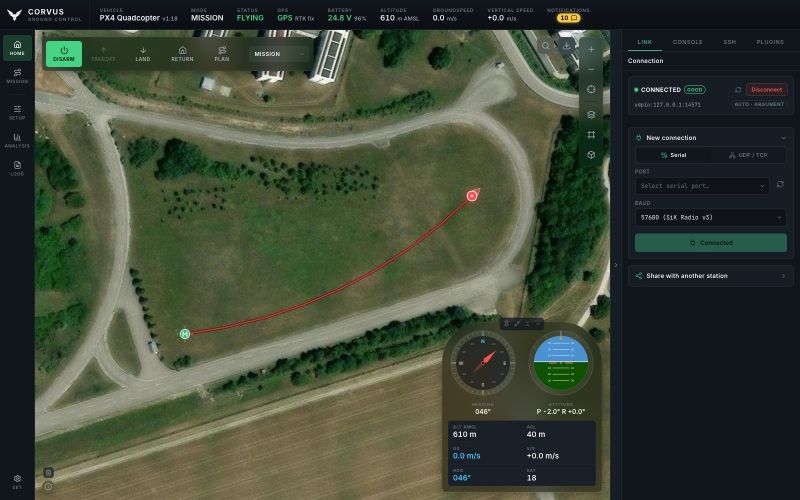
On connect Corvus streams only what flying needs: position, attitude, GPS, battery and link health. The full parameter set is loaded when you open the Parameters page.
Offline-first ground control station
Plan, monitor and control autonomous flight from one modern interface. Built for the field: a laptop, a telemetry radio, and no internet.
macOS Linux Windows PX4 & ArduPilot
Features
Every one of these is built and working today.
On connect Corvus streams only what flying needs: position, attitude, GPS, battery and link health. The full parameter set is loaded when you open the Parameters page.
Draw a take-off, waypoints, orbits and a landing on their own map, then read the whole flight as an altitude profile against the terrain under it. Save to disk, upload to the aircraft, fly on a second press.
A spinnable globe when you zoom out; ground with its real shape and extruded OpenStreetMap buildings when you zoom in. The aircraft is drawn at the altitude it is actually flying.
The interface loads nothing from the internet, and map tiles go into a local store as you use them. Download named regions ahead of time, elevation included, and the whole app keeps working with no connection.
Your airframe drawn to scale, every motor at its real distance from the centre of gravity. Click one to wire, position or bench-test it. Parameters with their firmware defaults, guided calibration, PID tuning and firmware flashing sit beside it.
Download the vehicle's ULog files over MAVLink and read them in the built-in Flight Review, on your own machine. Telemetry that Corvus recorded itself reviews the same way, radio link included.
Live Messages lists every MAVLink message on the link with its rate, its age and its count. Pick one and its fields update live beside the list. Every parameter carries an explanation, even where the firmware ships none.
A plugin is a folder: a script, a stylesheet, its own settings and its own translations. Four ship with Corvus and two more are a download away, from launch buttons for the companion computer to gates and trees placed on the map.
English, German and French, switched in Settings with no restart. A language is one file, so a new one needs no code, and a plugin brings its own words along.
Give every vehicle a radio and a link of its own. Corvus draws each one on the map in its own colour, with its name and its track, flies the one you pick, and reports the warnings of the others. Take control switches in one press.
Multicopters, planes, rovers and boats, on PX4 and on ArduPilot. A rover or a boat loses take-off and land, offers Drive to this point and lists its own modes, and every setup page shows the parameters that firmware really has.
Load your own GeoTIFF, XYZ or ESRI ASCII grids, such as a survey office's 20 cm surface model (DOM) or terrain model (DGM), as one file or a folder of tiles. Corvus converts them once and serves them itself, so every tree and roof stands in the 3D map with no connection.
Screenshots
31 screenshots of flying, setting up the aircraft, reviewing the flight and the plugins. Select one to view it full size.
The live map, the mission planner, the geofence in flight, and the workspace beside the map.
Calibration, radio, the geofence, tuning, motors, battery, safety and every parameter.
Logs downloaded from the aircraft and read on this computer, and every message on the live link. Nothing is uploaded anywhere.
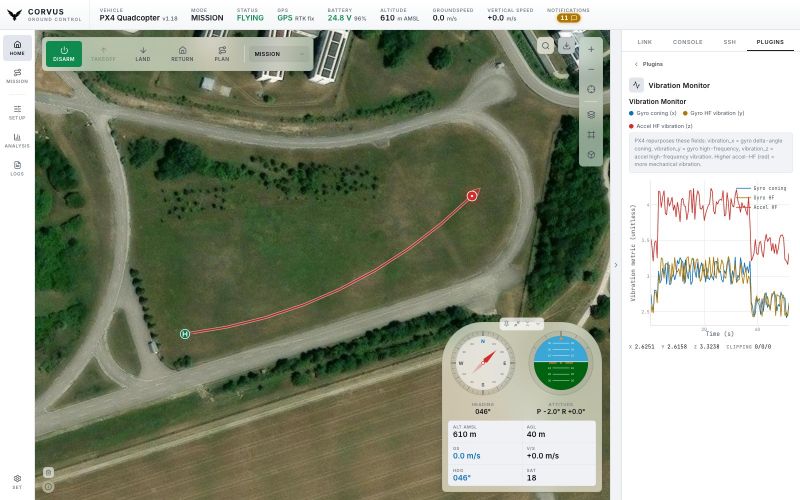
Four ship with Corvus, two more install from their own repositories. Each one runs beside the map.
Every screenshot is the real interface driven by real MAVLink: telemetry, parameters and the flown track all arrive over the wire. The aircraft producing them is simulated, not airborne, and the imagery is the Neubiberg test site. The pictures on this page use all six themes that ship.
Technical
A Python backend and a web frontend in one standalone desktop application. No server to deploy, no browser tab to manage.
| Autopilots | PX4 v1.16 · v1.17 · v1.18 as the primary target; ArduPilot 4.3 to 4.6 for Copter, Plane, Rover/Boat and Sub. Several vehicles connect at once, one link each: you fly one and see the others on the map. A rover or a boat gets its own controls. |
|---|---|
| Links | MAVLink over a serial telemetry radio, UDP or TCP. A USB flight controller, a SiK radio or the ground-station UDP port is found and taken automatically at launch, with link-quality display and automatic reconnect. |
| RTK GPS | A base station plugged into the same computer is detected and surveyed in, and RTCM 3 corrections stream to the aircraft. An NTRIP caster works the same way over the network. |
| Video | The aircraft's camera over RTSP (decoded with ffmpeg) or WebRTC from a media server such as MediaMTX, in floating windows you can move to a second screen. A frozen picture is greyed out, never passed off as live. |
| Maps & 3D | MapLibre GL JS with 6 map services with 20 layers (two of them on your own API key), terrain relief and extruded OpenStreetMap buildings. Tiles are cached to a local offline store, and named regions can be downloaded in advance with their elevation. Your own GeoTIFF, XYZ or ESRI ASCII surface models load as the ground. |
| Flight logs | ULog .ulg download and review in the built-in Flight Review; ArduPilot DataFlash .bin downloads but is not parsed. Corvus's own telemetry recording reviews on both stacks. |
| Tools | MAVLink console, SSH terminal to a companion computer, and a plugin folder. The Vibration Monitor, the SSH Launcher, Schwalby (buttons that run on this computer or over SSH) and Map Entities (trees, gates and devices with a range, placed on the map) are included. The NuttX Console (the PX4 shell over MAVLink, as a console or in a terminal window) and the Trajectory Viewer (a reference route from a file, drawn under the flown track) install from their own repositories. |
| Platforms | macOS 15 or later on Apple Silicon .dmg, Linux x86_64 .AppImage, Windows x64 .zip. Nothing else to install: Python, Qt and every dependency are inside. |
| From source | Python 3.12+ and one command, ./run.sh. The frontend is plain HTML, CSS and JavaScript; the desktop shell is PySide6. |
| License | Sustainable Use License 1.0 (fair-code). The source is open to read, modify and build on, for internal, personal and non-commercial use, but not to resell. |
Why I built this
They did the job, but they got in the way. They load every parameter before you can do anything, feel slow on a field laptop, and leave log review to separate tools. I wanted a station that is ready in seconds, fetches parameters only when I open them, has a flight reviewer built in, and gets the small details right, in simulation as much as on a real aircraft. And because no station covers every setup, you can write your own plugins and extend it yourself.
In my day-to-day work as a PhD researcher there is very little room for AI-assisted, “vibe-coded” development, because the setting simply does not allow for it. That method is nonetheless becoming a real part of how software gets built, and the only honest way to find out where it works, where it breaks, and how to direct it well is to use it seriously on something non-trivial.
Download
Download the latest Corvus GCS release or explore the source code on GitHub.
Releases are published on GitHub.
